
Google Ads AI Max: Trace the Conversion Before You Turn It Off
David A · Founder, 1212 Agency
Published November 11, 2026

We were halfway through rolling back AI Max when we found a sign-up from an ad click. The search terms report showed AI Max, not the keyword, had found it.
We were halfway through rolling back AI Max when we found a sign-up that had come in from an ad click that morning.
The account belonged to a B2B video software company. A few days earlier, the account had accepted a set of Google's recommendations that switched AI Max on in four Search campaigns and added broad keywords. The plan that morning was to roll all of it back. Just before we started, someone had signed up for a trial, one minute after clicking an ad.
So we stopped and traced it. The search terms report showed the click came from AI Max, on a search whose wording had little to do with the keyword it was reported under. The broad version of that keyword, added with the recommendations, had 0 clicks over the same days. And Google Ads had not recorded the conversion at all.
If we had judged AI Max on the conversion column, we would have turned off the one thing that had just found a customer. This guide covers what AI Max changes, why its results are easy to misread, and how to trace a conversion before you decide.
What AI Max is and what it changes
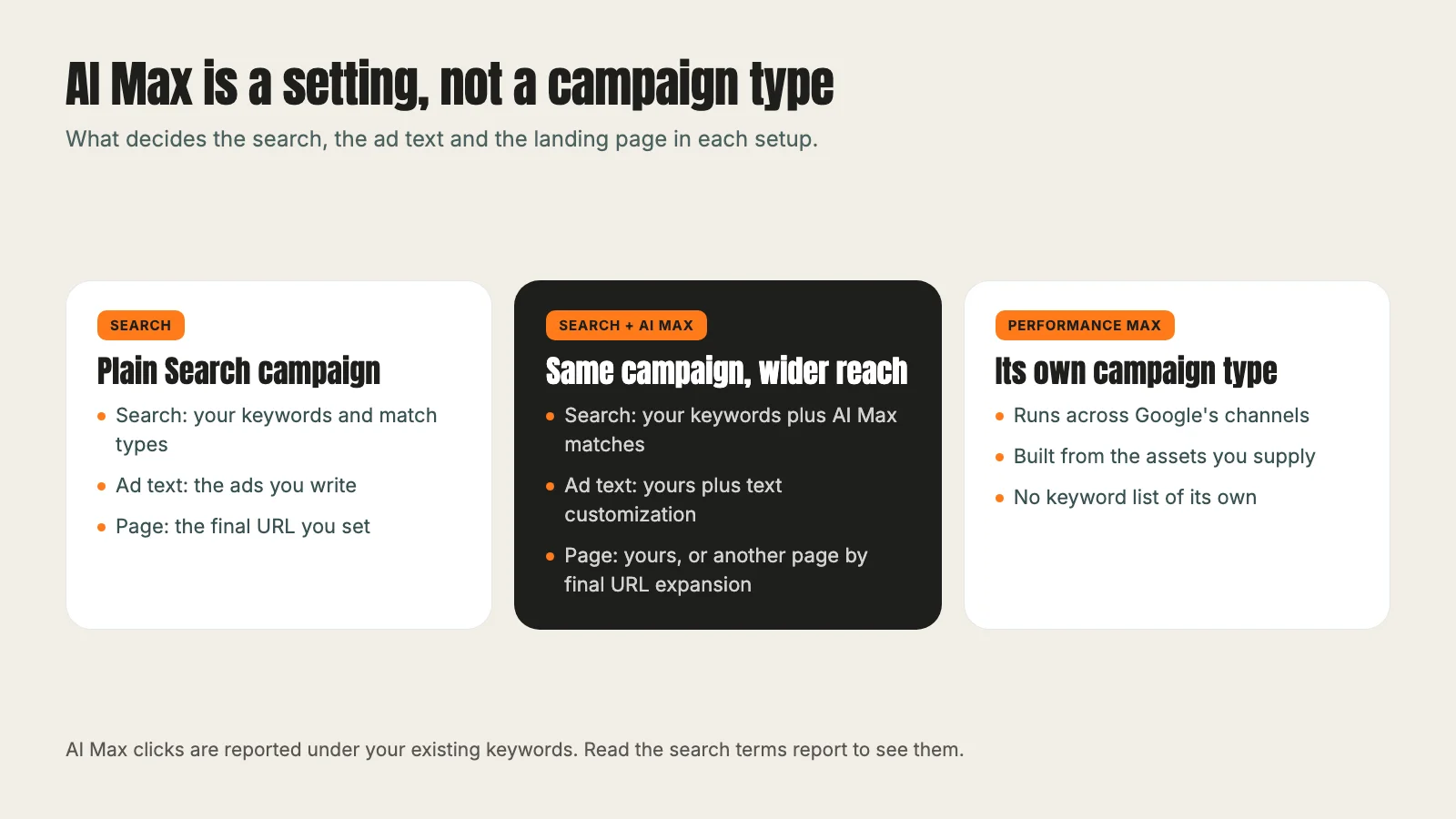
Google's page on how AI Max for Search campaigns works says it plainly: AI Max is not a new campaign type. It is a set of features you switch on inside an existing Search campaign. Your keywords, ad groups and budget stay where they are.
It changes three things:
- Search term matching. Your ads can show on searches beyond your keywords, using broad match style matching and what Google reads from your ads and landing pages.
- Text customization. Google writes new headlines and descriptions from your existing ads, landing pages and assets.
- Final URL expansion. Google can send a click to a different page on your site if it expects that page to do better. This one needs text customization switched on.
That is the difference from Performance Max, which is its own campaign type. AI Max lives inside the Search campaign you already run. That makes it easier to try, and harder to see.
Why its results are easy to misread
Because AI Max runs inside your campaigns, its clicks are reported under your existing keywords and ad groups. A keyword report can show a keyword "converting" when the search that converted was one you never chose.
Three things made our case easy to get wrong:
- The conversion was missing from Google Ads. The sign-up showed in the company's CRM (customer relationship management system), with the ad click attached. Google Ads recorded 0 for that conversion action. Anyone reading only the Google Ads conversion column would have seen nothing.
- The new keyword looked inactive. The click was reported under an existing keyword, and the broad version of it that the recommendations added had 0 clicks from that day until that morning. A keyword review would have marked the broad keyword as dead weight and missed what AI Max was doing.
- Other sign-ups were not from ads. The CRM showed 5 trial sign-ups in the days after the change, but 4 of them came from people who signed up on their own with no Google Ads click. That was the same pace as in the days before the change. Counting all 5 as ad results would have made the change look far better than it was.
Each of those is a reason to slow down. A setting that works inside your keywords needs to be judged one search term at a time, not one keyword at a time.
How to trace one conversion
Here is the path we followed. You only need the Google Ads interface and whatever system records your leads or sign-ups.
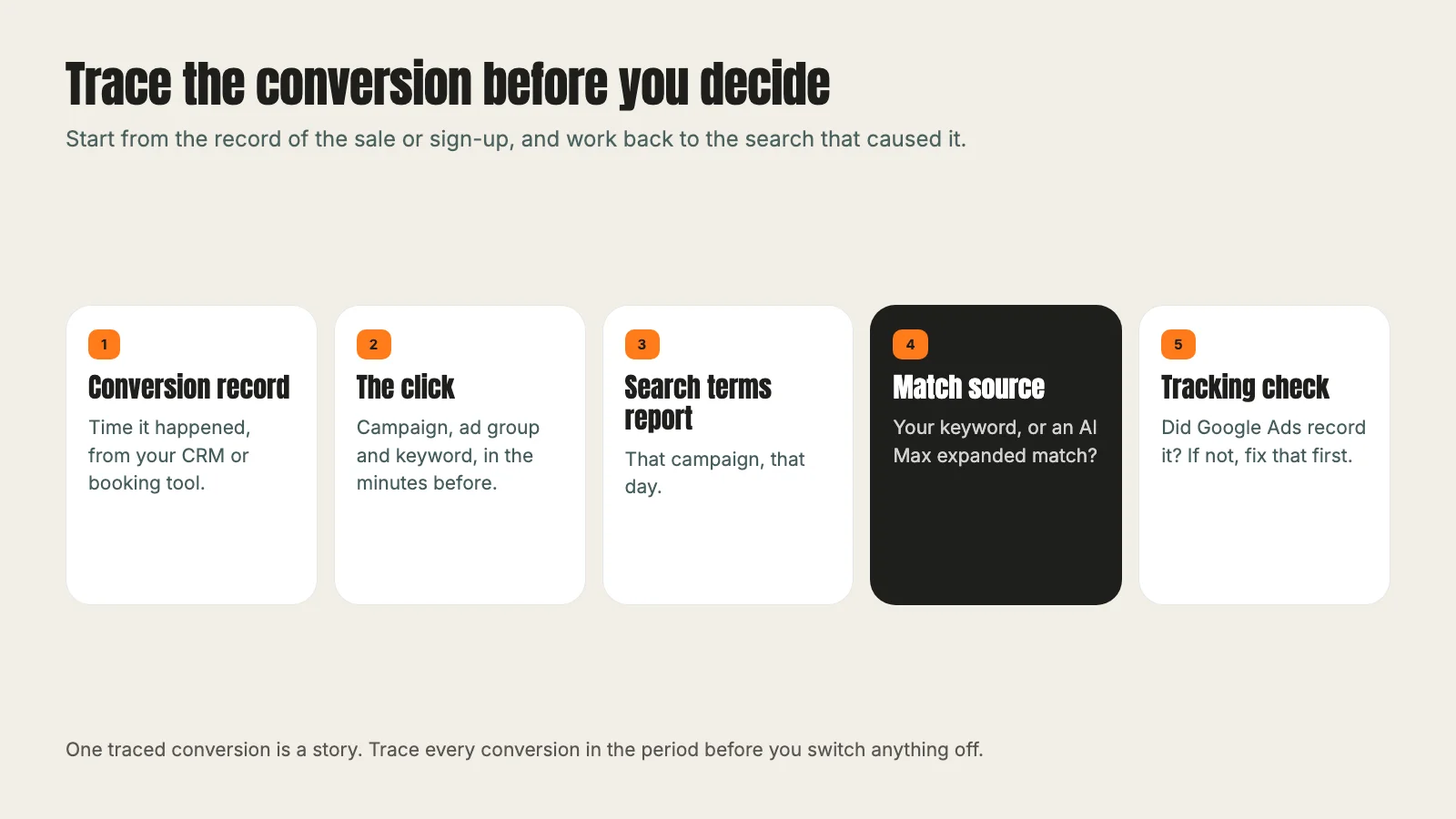
- Start from the conversion record, not from Google Ads. Take the time it happened from your CRM, your booking tool or your order system.
- Find the click. If your CRM keeps the ad click details, note the campaign, ad group and keyword. If not, look for clicks in the minutes before the conversion.
- Open the search terms report for that campaign and day. Google says the report lists AI Max as a match type for the extra search terms it finds, with a source column showing how the match was made.
- Read the search term and its source together. Was it your keyword, a close variant, or an AI Max expanded match? In our case, the source read "AI Max expanded matches".
- Check that tracking saw it. If your CRM has the conversion and Google Ads does not, fix the tracking before you judge anything. Our guide to Google Ads conversion tracking covers how to test that a conversion fires from a real ad click.
Do this for every conversion in the period, not just one. A single sign-up is a story. Ten traced conversions are a pattern you can act on.
What we found when we did
The sign-up came from an AI Max expanded match. The search had little in common with the keyword in its wording, and it was reported under an existing keyword, while the broad version added beside it had no clicks of its own in those days. The conversion was missing from Google Ads, so the platform had no record that the change had worked.
That changed the decision. We undid every change made that day, so the account went back to how it stood that morning, with AI Max back on. The next day we decided to keep AI Max and the broad keywords, and to clean up what AI Max was matching instead: we added phrase match negative keywords for software names that had nothing to do with what the company sells. Our guide to Google Ads negative keywords explains how we choose those without blocking good searches.
None of this proves AI Max is good for every account. It proves that you could not have known either way from the keyword report.
How to test AI Max safely
If you are turning AI Max on for the first time, or turning it back on, set up the test so you can read it:
- One campaign first. Pick a campaign with steady conversions. Leave the others as they are so you have something to compare against.
- Clean tracking. Every conversion you care about must be recorded in Google Ads, from a real ad click. If your sales happen in a CRM, connect it.
- A clear target. Decide the cost per conversion you can afford before you switch it on. Our pricing page explains how we set those targets with clients.
- The right bidding. Google's page on setting up AI Max says search term matching, final URL expansion and text customization need a conversion based Smart Bidding strategy to work well.
- URL limits. Use URL exclusions at the campaign level for pages that should never receive ad traffic, such as careers or support pages. If you want final URL expansion off, turn it off in the AI Max settings.
- Search terms every week. Read the AI Max matches weekly and add negative keywords for anything you would never sell to.
Give it at least a few weeks of conversions before you judge it. Changing settings every few days makes the data hard to read, because you cannot tell which change caused what.
When to leave it off
AI Max is not for every account. We would leave it off, or turn it off after tracing, when:
- Tracking is broken or partial. If Google Ads cannot see your conversions, Smart Bidding and AI Max are both optimizing blind.
- The budget is tight. If a campaign already runs out of money every day, wider matching spends the same money on less certain searches.
- Your traced matches are mostly irrelevant. If most AI Max matches you trace are searches you would never sell to, and negatives do not fix it, it is not paying its way.
- Your landing pages must be fixed. If a regulated offer or a specific funnel needs every click on one page, final URL expansion is a risk. Use URL exclusions, or turn the feature off.
If you are unsure how your account stands, a Google Ads audit checks tracking, matching and bidding in the right order. Our post on Facebook ads for contractors makes the same point on Meta: read what you actually got before you add or cut. If your conversions turn into demos for a software product, our guide to B2B SaaS lead generation shows how to follow them past the form. And if you would like us to run the trace for you, start with our Google Ads management service.
Frequently asked questions
Want this run for your business?
Tell us where to send it and we'll follow up with the strategies that fit your market.