
Google Ads Audit: Check What Each Campaign Is Told to Win
David A · Founder, 1212 Agency
Published October 21, 2026

An action can be Primary in your account and still be ignored by half your campaigns. Audit what each campaign is told to win before you touch bids.
Your conversion action says Primary. It is enabled. It is counting. And two of your four campaigns are not bidding toward it.
That is what we found in an audit last week. The account settings looked right. The form submission action was Primary and included in the account goals. But two campaigns had been set up to use their own goals, and those campaigns used the booked appointment goal but not the form goal. Google was doing exactly what those campaigns asked. Nobody had asked them to win forms.
A Google Ads audit is not a score out of 100. It is a short list of decisions: what to fix, what to leave alone and what to measure before you change bids. This guide walks through the order we use, with the real findings from that account. It was a B2B software company that sells to cultural organizations, with four active campaigns in the audit.
What an audit is for
An audit should change what you do next. A report that lists 60 best practices without ranking them leaves you where you started. The useful question for each check is: if this is wrong, what does the account do differently?
That question sets the order. Tracking and goals come first, because they decide what Google's bidding tries to buy. Assets and ad structure come next, because they decide what a searcher sees and how you read the results. Cost benchmarks come after that, because you need clean tracking to calculate them. Search terms, negatives and budgets come last. They matter, but tuning them on top of a broken goal setup only makes the wrong outcome cheaper.
We run audits in this order for every account we take on through our Google Ads management service, and the same order works for an in house team auditing its own account.
Start with conversion actions
Open Goals, then Conversions, and list every action. For each one, write down four things:
- Primary or Secondary. Google's conversion goals documentation explains the difference: Primary actions can be used for bidding and reporting, while Secondary actions only appear in the All conversions columns for observation.
- Counting. One per click suits leads, where a second form from the same person is not a second customer. Every suits purchases.
- Click window. How long after a click the conversion can still be credited. In the account we audited, the main actions used a 90 day window, which fits a sales cycle measured in weeks.
- Status. Enabled and recording, or quietly broken.
In our audit, the account had three main actions marked Primary and enabled: a booked appointment, a CRM lead and the website form submission. A separate, Google hosted lead form action was set to Secondary. That is a valid setup. The problem was not at this level.
If your tracking itself is in doubt, stop here and fix it before going further. Our conversion tracking guide covers the handoffs between the click, the form and your CRM, and where each one tends to break.
Then check goal coverage campaign by campaign
This is an easy check to skip, and it is the one that found our problem.
Google groups conversion actions into goals, such as "Submit lead forms" or "Book appointments." By default, a new campaign uses every account default goal. But a campaign can be switched to campaign-specific goals, and then it bids only toward the goals it selects. Google's documentation states the rule plainly: an action is used for bidding only when it is Primary and the campaign uses the goal that contains it.
So an action can be Primary in the account and still be invisible to a campaign's bidding. The account level view will not show you this. You need the campaign level view.
The fastest way to check is from the goal side. In the conversion summary, open each goal and view the campaigns that use it. Then compare that list to your active campaigns.
Here is what that showed in our audit:
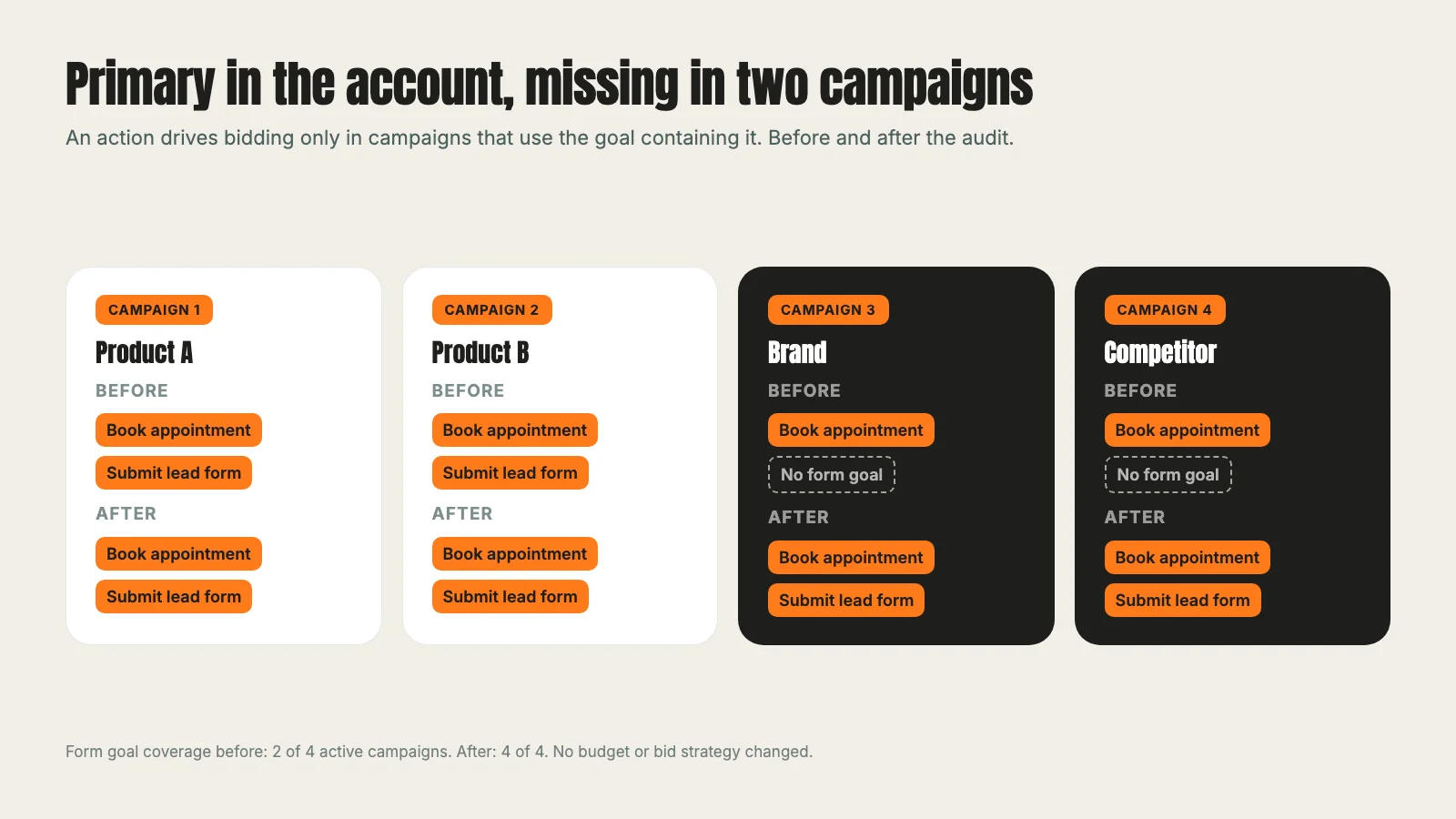
- Book appointments was used by all 4 active target campaigns.
- Submit lead forms was used by only 2 of the 4.
- The brand campaign and the competitor campaign used the booked appointment goal but not the form goal.
Those are campaigns where a searcher may well be ready to ask for a demo: someone searching the company name, or comparing it to a rival. Both campaigns were bidding as if a form submission were worth nothing.
The fix was small. We added the form goal to those two campaigns and kept the booked appointment goal in place. No budget or bid strategy changed. The live readback then showed the form goal on 40 of 40 campaigns in the account, up from 38 of 40, and all four active campaigns now used both goals.
One caution. Changing goals changes what Smart Bidding (Google's automated bidding) is learning from. Google's guidance on changing conversion goals says bidding takes time to relearn, one to two conversion cycles in most cases. Make the change, write down the date, and do not judge the result in the first few days.
Check where assets are attached
Assets are the extras around your ad: sitelinks, callouts, structured snippets, images. Each one can be attached at account, campaign or ad group level. When the same kind of asset sits at several levels, the more specific level generally takes priority, but the account fills up with associations that nobody is sure are serving.
That makes the results hard to read. If a sitelink is attached to a campaign and to each ad group inside it, you cannot tell which version a searcher saw or which one earned the click. Your asset report shows numbers, but you cannot act on them with confidence.
In the same account, sitelinks had been rolled out at both campaign and ad group level. We paused the 24 campaign level sitelink associations, six in each of the four campaigns, and kept every ad group association. Afterwards the account showed 94 enabled sitelink associations, all at ad group level, and a filter for account or campaign level sitelinks returned nothing.
The rule we use: choose one level per asset type, on purpose, and write it down. Ad group level gives you the tightest match between search, ad and page. Account level is fine for something that is true everywhere, like a phone number. Mixing them without a reason is the problem.
Set a cost benchmark from a clean baseline before target CPA
Once goals and assets are right, you can ask what a fair cost per result looks like. Do it before anyone switches on a target CPA (a bid strategy where you tell Google the average cost per conversion you want).
Google's Target CPA documentation says the recommended target is the average cost per acquisition from the last 30 days, adjusted for conversion delays. That recommendation is only as good as the 30 days behind it. If two campaigns were not counting forms during that window, the history describes the old setup, not the new one.
In our audit we pulled the four weeks before the fix, Sep 16 to Oct 13, across the four active campaigns. The baseline came to:
| Outcome | Cost per result |
|---|---|
| Recorded form conversion | $238.61 |
| Booked appointment | $1,064.56 |
| Either action (combined) | $194.92 |
Read those numbers carefully. The combined figure is not a cost per unique lead, because one person can submit a form and later book a meeting. The form count also included lighter actions such as a product preview, and had not yet been checked against the CRM for duplicates or fit.
So we did not set a bid target from them. We agreed two internal benchmarks to compare results against, $200 per valid form lead and $600 per booked demo, and left the bid strategies alone while the new goals settled. Each campaign mixes forms and bookings, so a single target CPA would control their combined cost, not each outcome separately. That is a decision to make with clean post change data, not on the day of the audit.
If you want to sanity check what a target means for your budget, our cost per lead calculator does the arithmetic. It cannot tell you whether the leads are good. Your CRM can.
Search terms, negatives and budgets come last
With goals, assets and a baseline in place, the familiar checks finally mean something.
Search terms. Read what people actually typed, not just the keywords you bought. Look for searches that could never become customers, and for good searches that are landing in the wrong campaign.
Negatives. Add exclusions for the irrelevant searches, but check what each one would also block. Our negative keywords guide shows how a single word can remove real buyers along with the noise.
Budgets. Look for campaigns limited by budget while they meet your benchmark, and for campaigns spending freely while missing it. Move money toward the first group. Do not raise budgets in the same week you changed goals, or you will not know which change moved the numbers.
Bid strategy. Only now ask whether the strategy fits the data. A campaign with few conversions may not give automated bidding enough to learn from. A campaign with steady volume and a trusted baseline may be ready for a target.
A one page audit checklist
Work through it top to bottom. Stop and fix anything broken before moving down.
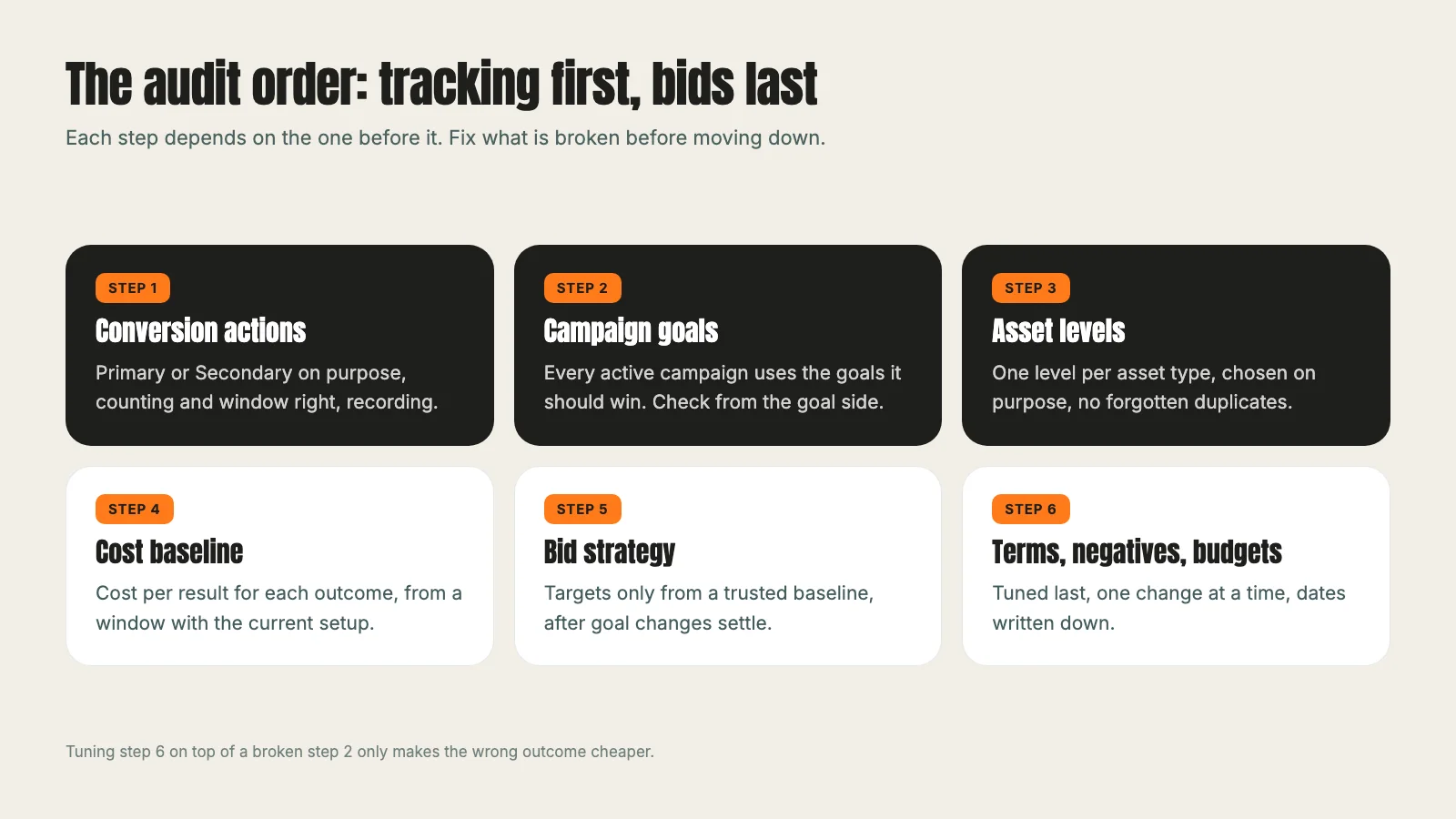
- Conversion actions. Each one is Primary or Secondary on purpose, counts the right way and is recording.
- Campaign goals. Every active campaign uses the goals that match what it should win. Check from the goal side, campaign by campaign.
- Asset levels. Each asset type lives at one level you chose, with no forgotten duplicates.
- Cost baseline. Cost per result for each outcome, from a window with the current setup, with combined figures labelled as combined.
- Bid strategy. Targets set only from a baseline you trust, after goal changes have settled.
- Search terms, negatives and budgets. Tuned last, one change at a time, with dates written down.
The goal fix itself was one edit. The four weeks of history before it are why we were careful about what came next. If you run this checklist and find a gap like ours, fix it, note the date and give the bidding time before you judge it.
For a view of how this kind of tracking work feeds pipeline reporting, see our museum technology SaaS case study. The same discipline applies on Meta: our guide to Facebook ads cost covers how we read cost per result there before raising a budget. And if you would rather have someone run the audit with you, our Google Ads pricing shows what that costs.
Frequently asked questions
Want this run for your business?
Tell us where to send it and we'll follow up with the strategies that fit your market.