Google Ads Conversion Tracking: Keep the Click ID From the Ad to Your CRM
David A · Founder, 1212 Agency
Published October 7, 2026
The tag firing is the easy part. Leads go missing between the ad click and the CRM, and Google Ads keeps bidding on half a picture. Here is where the click ID gets lost and how to keep it.
Google Ads says it drove 4 trial signups in a week. Your CRM shows 1. Both systems are working. The lead just lost its name tag somewhere between the ad and the contact record.
That gap is what most conversion tracking problems look like in a B2B account. The tag fires, Google Ads counts the conversion, and the sales team receives a lead filed under Direct or Unknown. Nobody can say which campaign or keyword produced it, so nobody can say which ones to fund.
Google Ads conversion tracking is usually set up as a tag problem: install the tag, define the conversion, check it fires. That part is easy, and in most accounts we audit it is already done. The harder part is keeping one small value, the click ID, attached to the lead all the way into your CRM. This post is about that part.
What conversion tracking measures, and where it stops
When auto-tagging is on, every ad click lands on your page with a parameter added to the URL. Google's own page on auto-tagging shows the shape of it: a click on an ad for example.com arrives as example.com/?gclid=123xyz. That gclid (Google Click Identifier) identifies the ad click.
The Google Ads tag reads it, and when the visitor converts, Google matches the conversion to the click. That is all the tag does. It reports to Google. It does not put anything in your CRM.
So there are two records of the same lead. Google Ads has one: a conversion tied to a click, a keyword and a campaign. Your CRM has the other: a contact with a name, a company and, if you are lucky, a source. The two only connect if the click ID travels with the lead into the CRM contact. When it does not, you get the 4 versus 1 problem, and every report built on the CRM undercounts paid search.
The three places the click ID gets lost
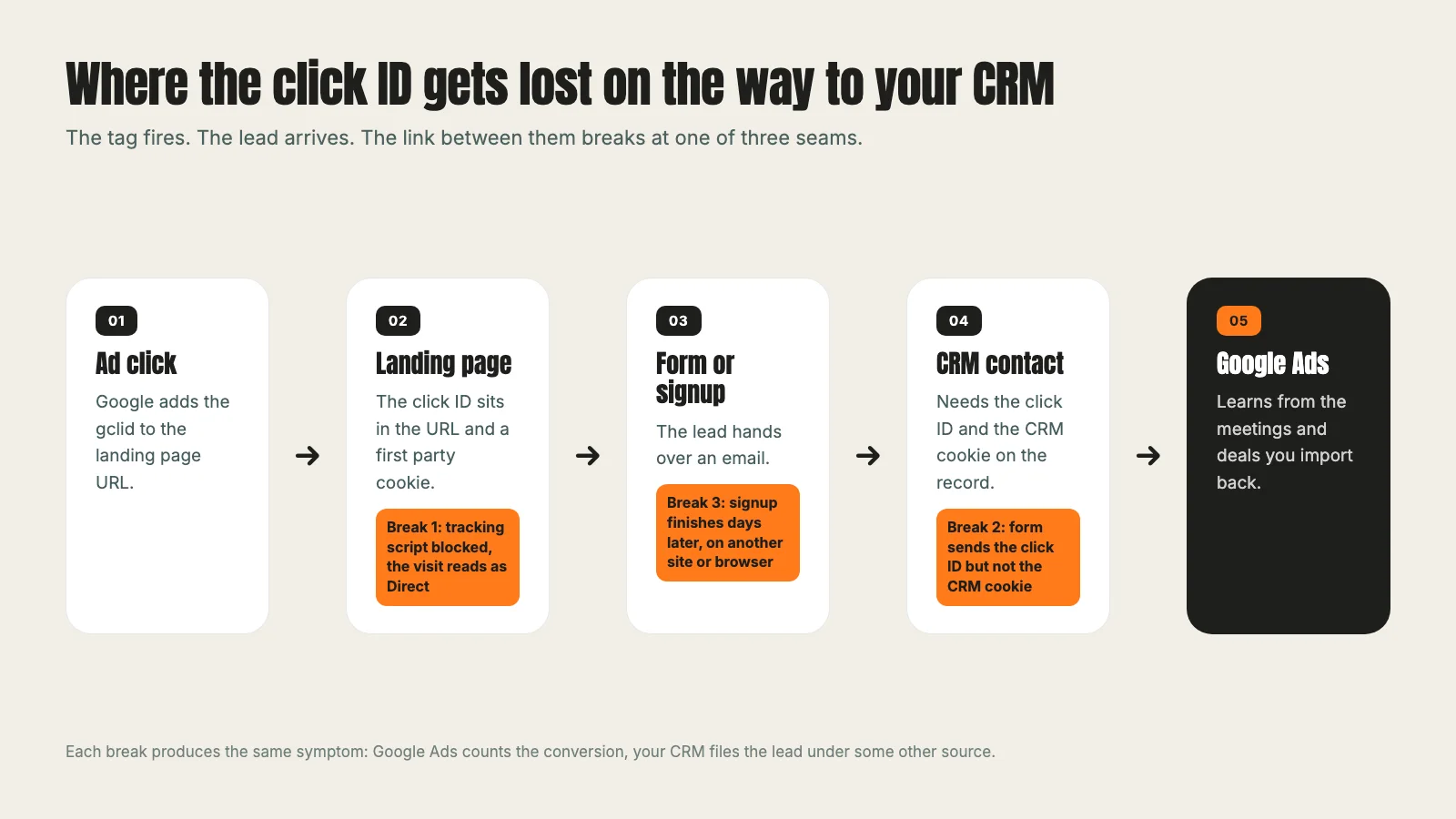
We spent the last two weeks tracing missing leads in two B2B accounts. Every one of them broke at one of three seams.
1. A blocked tracking script turns a paid lead into Direct
A meeting booked through a B2B software company's calendar arrived in the CRM marked as Direct. The booking itself carried the paid UTM tags and the campaign name. But the contact had zero page views. The CRM's tracking script, loaded through Google Tag Manager, never ran in that visitor's browser, most likely blocked. With no page views, the CRM fell back to Direct.
No page change fixes that one. What you can do is write the click ID and UTM tags onto the submission itself, so the paid source is still on the record for you to read, even when the CRM's own source field says Direct. That leads to the second seam.
2. The form sends the click ID but not the CRM cookie
The same company had a lead form that did half the job. It sent the click ID inside the page URL with every submission, but not the CRM's own visitor cookie. In HubSpot that cookie is called hutk. Without it, HubSpot creates the contact but cannot tie it to the visits that came before, so the contact shows no page views and the conversion floats free of the session that produced it.
The fix was one field added to the submission, the same way the company's other forms already sent it. We tested it live: HubSpot answered the submission, the cookie was on it, and the conversion landed on the contact tied to the browser's page views.
3. The signup finishes days later, somewhere else
This is the expensive one, and it hits any company with a free trial. A video software company sent ad traffic to its landing page, and the trial button sent visitors on to the product's own signup. People entered an email, then confirmed it two or three days later. By then the click ID was often gone.
It most likely disappears for ordinary reasons. The click ID cookie lives on the landing page's domain, so a signup on a different domain cannot read it. Some browsers expire it after about a week. And the confirmation link in the email often opens in a different browser or on a phone. In one week, Google Ads counted 4 trial signups and the CRM showed 1 with a paid source. Of the three missing, one trial reached the CRM without its click ID, and two most likely never finished the signup, so the CRM never heard of them. Both gaps close the same way.
Capture the click ID at the first submit on your own page
The fix for the trial gap was to stop waiting for the signup to finish. The trial button on the landing page now opens a small box that asks for a work email. That email goes straight to a CRM form together with the page URL, which still holds the click ID, and the CRM cookie. Only then does the visitor continue to the product signup, with the email already filled in.
The CRM gets a short window to receive the submission and never blocks the redirect, so the visitor does not wait. The contact exists, with its paid source, before the person has even reached the signup page.
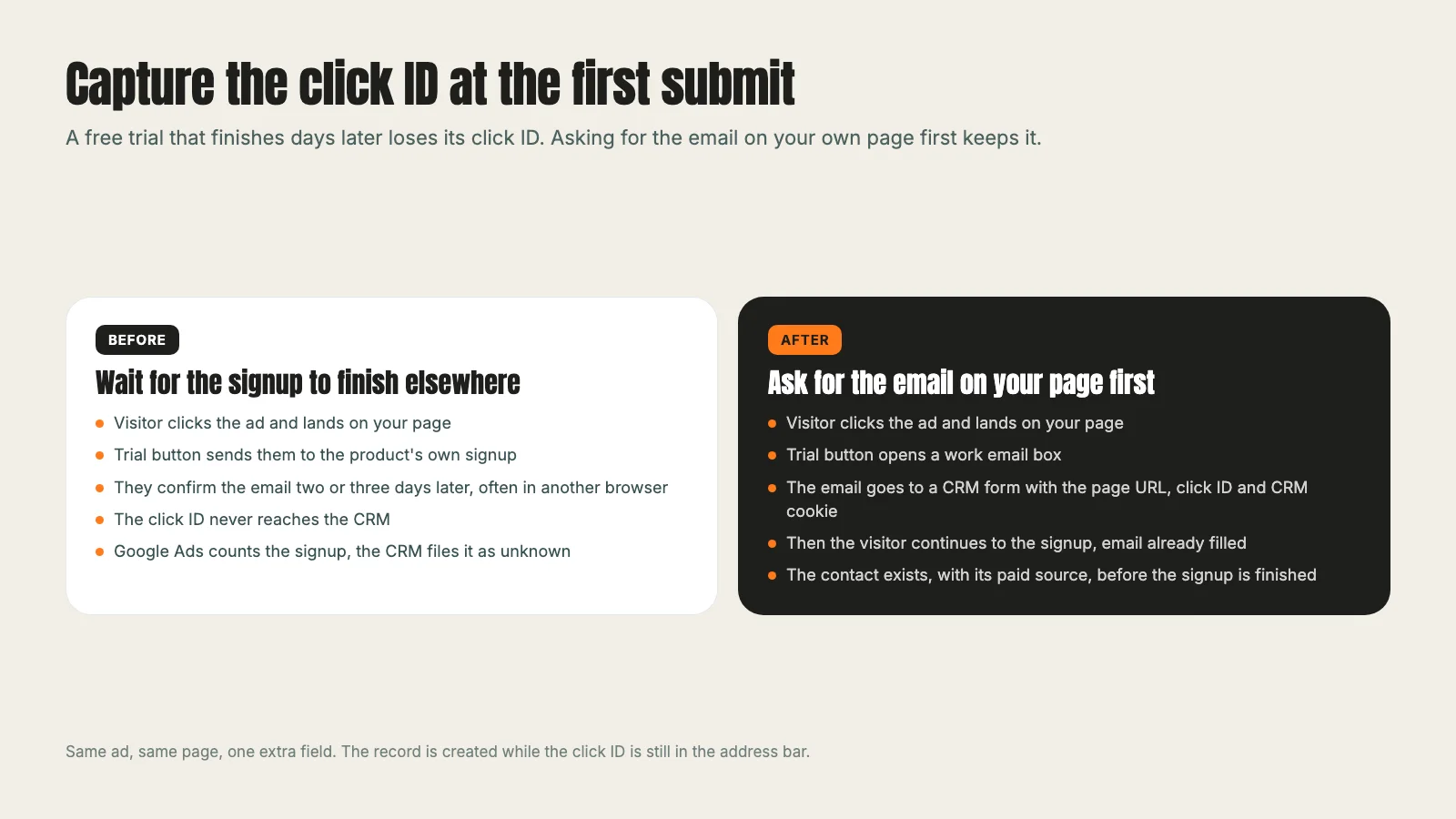
We ran a controlled test before calling it done: a test click ID in the URL, a test address, cookies cleared first. The new contact carried the click ID and the Paid Search source, and the redirect kept the click ID and UTM tags for the product's own tracking. Then the signup was finished from the confirmation email, and the trial account landed on the same contact.
The general rule: create the CRM record at the first moment a person gives you anything, on a page you control. Every step that happens later, on another domain or another device, is a chance to lose the thread.
Our travel magazine case study reports a 5.28% conversion rate from tightly targeted ads and optimized landing pages. A number like that is only worth reporting when every conversion behind it is counted on a page you control.
Send the CRM cookie with every form
If your forms are native CRM forms embedded on your site, they usually send the cookie on their own. Booking calendars embedded from the CRM often do too. The risk is the custom form: a page builder form, a calculator, a quote tool, anything that posts to the CRM through an API.
For each of those, check that the submission includes:
- The CRM visitor cookie (hutk in HubSpot), so the contact is tied to its visits
- The full page URL, with the click ID and UTM tags still on it
- The page name, so you can see which page converted
Miss the first and the contact has no history. Miss the second and it has no source. Our Google Ads management work starts with this check before a single bid changes, because no bid strategy can fix a lead it cannot see.
Test it end to end with a test click
You do not need to wait for a real lead to find out whether tracking works. Build the test yourself:
- Open your landing page with a test click ID and tags added to the URL, for example ?gclid=TEST123&utm_source=google&utm_medium=cpc.
- Clear the site's cookies first, so you see what a new visitor sees.
- Submit the form with a test address you can find again.
- Open the new contact in the CRM.
It should carry the click ID, a paid source and the page it came from. If you run a trial or a booking step on another domain, finish that step too and check the result lands on the same contact.
A fake click ID will not match a real click, so Google Ads will not record a conversion from the test. That is fine. The test is about your side of the pipe, which is the side that breaks.
Import offline conversions so Google learns from meetings and deals
Once the click ID is stored on the contact, you can send outcomes back. Google calls this offline conversion import: you save the click ID with the lead, and when that lead becomes a sale later, you give the click ID back to Google Ads along with the type of conversion.
For a B2B company the outcomes worth importing are usually a booked meeting, a qualified opportunity and a closed deal. Google then learns which searches produce pipeline, not just which ones produce form fills. That is how a campaign stops optimizing for cheap leads that never answer the phone.
One caution from this week. We looked at importing two later stages for one account and held off: they would have been counted on top of the form fills, which would have inflated the conversion totals and made cost per lead look lower than it is. Decide for each stage whether it should count toward the numbers you bid on and report on before you switch it on.
It is also worth checking the conversion window while you are in the settings. A B2B form with a 7 day click window ignores anyone who clicked, thought about it, and came back the next week. We moved one account's form conversion from 7 days to 30 this week for exactly that reason.
Our industrial automation case study shows cost per lead falling 85% over an ongoing program. A reading like that holds only when the leads that come back a week later are counted too.
A 10 minute audit checklist
Run this on your own account before you change a bid or a budget:
- Auto-tagging is on in Google Ads account settings.
- Every landing page keeps the click ID in the URL, including after redirects.
- Every form sends the page URL and the CRM cookie, including custom forms and calculators.
- The CRM stores the click ID in a field on the contact.
- Trials and bookings on another domain create the contact on your page first.
- A test click produces a contact with the click ID and a paid source.
- Offline stages you import are chosen on purpose, with a decision on whether each one counts.
- The click window fits how long your buyers take.
- Google Ads and the CRM agree within reason on last week's paid leads. If one shows 4 and the other 1, start at the top of this list.
No bid strategy can fix a lead it cannot see. Fix the pipe, then fix the bids.
If your numbers already agree, you are ahead of most accounts. If they do not, the gap is rarely in the ads. It is in the handoffs. Once tracking holds, the next question is where to spend, including whether a second search engine is worth it, which we cover in Bing Ads vs Google Ads. And if you want to see what a full engagement covers, the paid ads management page and our pricing lay it out.
Frequently asked questions
Want this run for your business?
Tell us where to send it and we'll follow up with the strategies that fit your market.