Bing Ads vs Google Ads: What Doubling a Microsoft Ads Budget Taught Us
David A · Founder, 1212 Agency
Published October 7, 2026
Microsoft Ads is a smaller auction, so a budget does not scale the way it does on Google. What happened when a B2B account doubled its Microsoft Ads budget, and how to decide where your money goes.
A B2B software account doubled its Microsoft Ads budget after the platform reported lost impression share. In the first four days it booked 3 meetings and a form lead, and the best cost per meeting of the month. In the next four days it booked nothing, while the cost per click nearly doubled.
Same campaign, same ads, same targeting. What changed was the auction. That test answers the question most comparisons of Bing Ads vs Google Ads skip: not which platform is better, but how much of each one your business can actually buy.
This post is the short answer by business type, the real differences in reach, cost and audience, our test day by day, and how to run the same test on your own account.
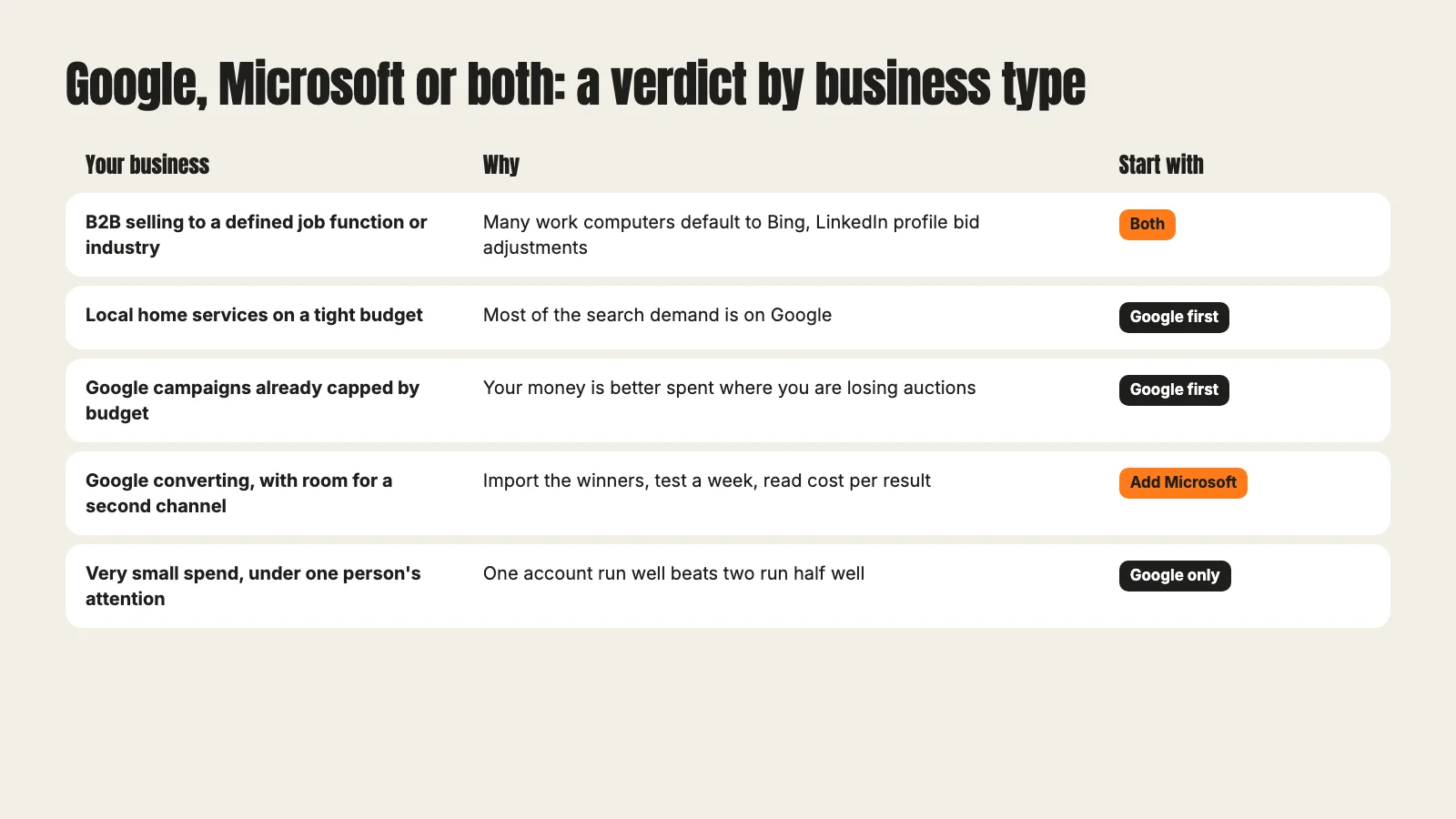
The short answer by business type
If you only read one section, read this one.
- B2B selling to a defined job function or industry: run both. Microsoft Ads lets you adjust bids by LinkedIn profile data, which Google cannot do.
- Local home services on a tight budget: Google first. Most of the search demand you need is there, and splitting a small budget slows both accounts.
- Google campaigns already limited by budget: fix Google first. Your next dollar is better spent where you are already losing auctions you could win.
- Google converting, with room for a second channel: add Microsoft, import what works, and test a week at a time.
- Very small spend, run by one busy person: Google only. One account run well beats two run half well.
Reach: a smaller auction runs out of cheap clicks
Google is the bigger search engine by a wide margin. Microsoft Ads serves ads on Bing and its partner sites, and Bing is the default search engine on many work computers through Windows and Edge. For a B2B advertiser that last point matters more than the overall size: the people you want are often searching from a work laptop at a desk.
But smaller is the key word. In a smaller auction there are fewer searches for any given keyword. Once your ads show for most of the searches you qualify for, there is no more cheap traffic to buy. More budget then pushes you into higher positions and wider matches, and you pay more for each extra click.
This is the single most important difference for budget planning. On Google, a budget increase in a healthy campaign usually buys more of the same kind of click for a while. On Microsoft, you hit the ceiling much sooner.
Cost: what the cost per click gap hides
Microsoft clicks are often cheaper than Google clicks for the same keyword. That is the headline most comparisons lead with, and it can be true as far as it goes.
The problem is that cost per click is the wrong scoreboard. A cheaper click that never becomes a meeting costs more than an expensive one that does. And as our test shows, the cheap clicks on Microsoft are the first ones you use up. The cost per click you see in a small test is not the cost per click you will pay at twice the budget.
Read both platforms on the same number: cost per meeting for B2B, cost per booked job for home services, cost per deal if your CRM can tell you. If you need a starting point, our cost per lead calculator works the same way for either platform.
Audience: LinkedIn profile targeting for B2B
This is where Microsoft earns its place in a B2B account. Microsoft Ads is the only platform besides LinkedIn itself that lets you use LinkedIn profile targeting: company, industry and job function, on Search campaigns among others.
Read the fine print, though. Microsoft's own documentation says LinkedIn profile targeting does not narrow your audience. It works as a bid adjustment: you bid more for searchers who match the profile, but the ads still show to everyone else who searches the keyword. Think of it as "bid only", not "target and bid".
Used that way it is powerful. A software company selling to finance teams can bid up when a searcher's job function is Accounting, and leave everyone else at the normal bid. Google has nothing like it on Search. If you want job title targeting that actually excludes everyone else, that is LinkedIn Ads, at LinkedIn prices.
Our budget test, day by day
Here is what happened in the account from the opening.
The setup. A B2B software company selling to nonprofits runs a Microsoft Ads search campaign next to its Google Ads account. Performance had dropped and the platform flagged lost impression share, meaning the campaign was missing auctions because the budget ran out. We doubled the budget for a test of about a week and read eight days of results.
Days 1 to 4. It worked. 3 booked meetings and 1 form lead. 2 of those meetings became sales opportunities. Cost per meeting for the test week came in about 35% below the average of the three weeks before.
Days 5 to 8. Nothing. 0 conversions. The average cost per click went from $3.92 in the three weeks before the test to $7.13. Impression share went from about 13% to between 38% and 45%. Lost impression share to budget, the metric that justified the test, fell to about zero. On two days the campaign also spent above its daily budget.
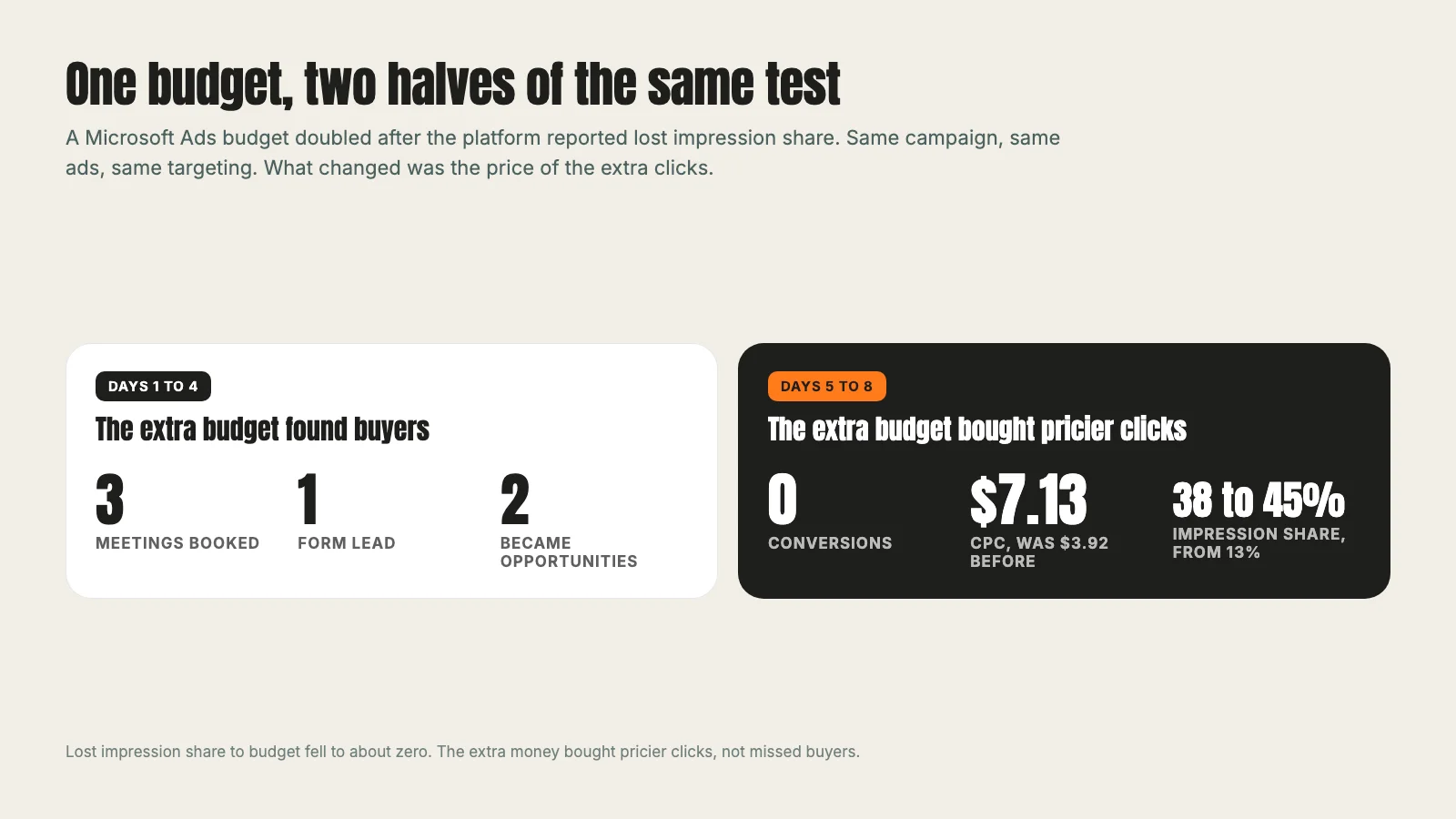
What it means. The lost impression share was real, and the first half of the week proved there were buyers in the searches we had been missing. But once those were reached, the extra money had nowhere useful to go. It bought the same searches at higher positions and stretched into weaker ones. The extra budget bought pricier clicks, not missed buyers.
What we did. We did not revert. The first four days were the best the channel had looked all month, so going back to the old budget would throw that away. We did not keep the doubled budget either, because at the second half's pace it would spend a lot to produce nothing. We stepped back to a middle level, about twice what the campaign had really been spending before the test, and set a review for one week later.
Lost impression share tells you there are auctions you are missing. It does not tell you how many of them contain a buyer.
How to test a Microsoft Ads budget change
You can run the same test without waiting for a bad week to find out.
- Change one thing. The budget, nothing else. No new keywords, no new ads, no bid strategy change in the same week.
- Run it for one week, long enough to cover weekdays and a weekend.
- Read it day by day, then in halves. A good week total can hide a second half that bought nothing, which is exactly what ours did.
- Read cost per meeting, not cost per click. Use the outcome your sales team cares about. Make sure your tracking reaches the CRM first; we explain how in Google Ads conversion tracking.
- Watch lost impression share to budget. When it falls to about zero, more money stops reaching new people.
- Step back, do not revert. If the first part of the test worked, settle on a level between the old and new budgets and review again a week later.
Importing from Google Ads: what carries over and what does not
Most teams start a Microsoft account by importing from Google, and that is the right call. Microsoft's own list of what gets imported from Google Ads covers most campaigns, ads, keywords and extensions. A few things need attention after the import:
- Some items are not imported. Automated rules and IP exclusions have to be recreated by hand.
- Low bids and budgets are raised to Microsoft's minimums, so check them before the campaign spends.
- Some bid strategies are converted. If a strategy is not supported, it falls back to another one, and if you have no conversion goal set up in Microsoft, a strategy that needs one is converted to one that does not.
- Conversion tracking is separate. Microsoft uses its own UET tag (Universal Event Tracking). Set it up and confirm it records the same conversions as Google before you compare the two platforms.
Running both
When a B2B account runs both platforms, the pattern we recommend:
- Google carries the volume. It gets the budget first, and its campaigns are built and tested there. Our Google Ads management work is where most of that happens.
- Microsoft runs the proven keywords imported from Google, with LinkedIn profile bid adjustments layered on top for the job functions that buy.
- Both report on the same outcome in the same CRM, so a meeting from Bing and a meeting from Google count the same way.
- Microsoft budget changes are tested a week at a time, because its ceiling arrives sooner.
Our sports technology SaaS case study, a Meta Ads program, shows why the shared CRM matters. Each lead was tracked in the CRM from the form to the opportunity, so the number reported was pipeline, not clicks.
If you are deciding whether Microsoft belongs in your plan, our Microsoft Ads management page explains how we set it up, and our paid ads management overview covers how the channels fit together.
Frequently asked questions
Want this run for your business?
Tell us where to send it and we'll follow up with the strategies that fit your market.